Rules for Change Requests
General rules for Change Requests
The requestor has to affirm that established norms, standards and guidelines were considered when creating the CR. If the CR was submitted by an ECLASS EG, they have to confirm that the submitted CR was consolidated with the whole group. CR can only be submitted, if the following preconditions are valid:
- All mandatory fields are filled in English (if possible, also in German and other languages)
- They meet all formal requirements (ContentDevelopmentPlatform, Import Template)
- They meet the guidelines on spelling, syntax, field formats, units, definitions etc.
- The CR is in conformity to the data model
- In case a CR was submitted for a MinorRelease its content has to be checked if it contains only compatible changes
- Certain special characters are not allowed in text fields. Special characters are characters that are neither a letter, nor a number and are used as control characters (according to ISO 2382-4). Some special characters cannot be handled by some IT applications and are therefore no allowed (see figure below).
- No line break is allowed
- No structural element is deleted. Structural elements can be withdrawn, assignments can be withdrawn. But all structural elements will stay part of the ECLASS dictionary and simply be marked as deprecated, i.e. they are kept in the database. An identifier cannot be used again (unlike a class CodedName that can be used again after some releases).
For an overview of all formal rules, please see the following section about naming rules and Figure 1: Overview of characters, below.
Naming rules
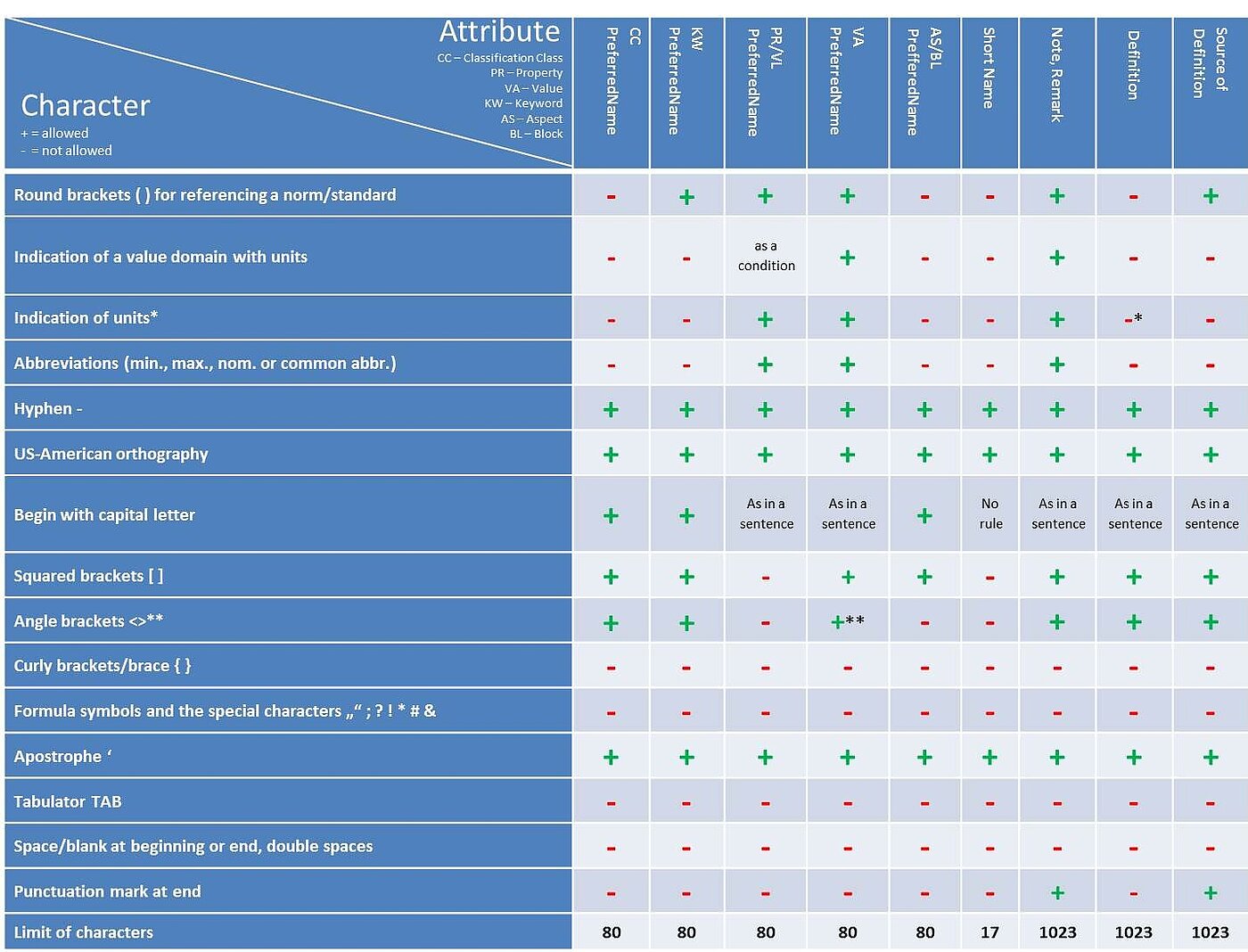
**In the VA PreferredName only in terms of greater than, less than
For an overview of all formal rules please see Figure 1: Overview of characters below.
Apart from that the following general naming rules apply:
- Generally, names shall be written as in common language, e.g. Property BAB050 "static load number" (AND NOT: "load number, static")
- Always use the singular form, exception: plural words as e.g. glasses, scissors, trousers etc.
- No trademarks, company or brand names are allowed anywhere in ECLASS
- No abbreviations allowed in class names
- Round brackets ( ): Additions to a PreferredName that are not part of the name itself, can be added behind the name in round brackets. It can be references, additional information on the application area or a restriction
- Example 1: all additional names in descriptive codes of parts (parts), accessories (accessories) and (unspecified)
- Example 2: to refer to a norm: Property AAL060 "cross gearing (acc. DIN MX) present"
- Example 3: to refer to an application area: (lab), (medical), (marketing)
- Unit reference: Is only allowed in the PreferredName of properties (same rules for ValueLists) and values and has to be done with the help of round brackets
- Example 1: unit reference in property AAF975 "max. rated voltage (at AC 50 Hz)"
Certain other naming rules apply for the creation of new structural elements. These rules are listed in every single section of a certain structural element.
Please see the sections of the structural elements for further reading:
- Classification Class (same applies for Application Class, Aspect and Block)
- Keyword
- Property (same applies for Value List)
- Value
For an overview of all formal rules, please see the figure below:
Figure 1: Overview of characters
All other rules for Change Requests are to be found on the relevant pages of each structural element, see Using the Content Development Platform